Join WhatsApp Channel Join Now
Join WhatsApp Group Join Now
Telegram Channel Join Now
Showing posts with label Technical Interview Questions. Show all posts

Saturday, 25 December 2021

Difference Between Method Overloading and Method Overriding

In Every interview frequently asked Technical question will be difference between method overloading and method overriding. If you give exact answer for this question without confusion, then selection chances for you are 90%. If you are not able to give answer for this question (even if you give answers for some other questions) chances of your selection will be 25%. That's the important of this question in Interview.
Difference Between Method Overloading and Method Overriding in .Net/ JAVA
The concept of difference between method overloading and method overriding (in .NET or Java) is bit confuse. But here we will explain it in very simple manner, so that it helps you to remember it easily. Here we provide each difference clearly without confusion.

Before proceeding further, If you would like to get IT jobs updates or notifications at the earliest, please join with us on any one of the following channel which you prefer.


Also, 
Method Overloading:
  1. Here you can remember Method Overloading means, Methods are sharing Same Name but Parameters are different or parameters having different types and order.
  2. In Method Overloading you can Add or Extend More to Methods behavior.
  3. In Method Overloading methods must differ in the type and/or number of their parameters.
  4. The Advantage of Method Overloading is the same method call gives different outputs when called different times
  5. Method Overloading is the concept of compile time polymorphism
  6. Method overloading doesn't need Inheritance
  7. Method Overloading should be done within the class
  8. Only One class is enough for Method Overloading, No need Of Sub classes or child classes
  9. In Method Overloading, relationship is there between methods of same class
Example Program for Method Overloading:
In the following example (Method Overloading program), you can clearly observe Method names and parameters and how those are getting used. 

In Method Overloading, there will be multiple methods with the same name but with different parameters.
method overloading vs method overriding

Method Overriding:
  1. Here you can remember Method Overriding means Methods are Sharing same Name Same Parameters But in the Different class
  2. In Method overriding you can't Add or Extend More to Methods behavior, But you can change "Change" existing behavior of method.
  3. In Method Overriding Method names and parameters are same.
  4. Method Overriding is the concept of Run time polymorphism
  5. Method Overriding need inheritance
  6. Method overriding must need Class and Sub-Class or child class
  7. In Method Overriding, relationship is there between methods of super class and sub class
  8. Method Overriding always need inheritance
Example Program for Method Overriding:
In the following Method Overriding example program, you can clearly observe Method names and parameters and how those are getting used. 

In Method Overriding, there will be multiple methods with the same name and same parameter but they are in different classes.
Examples for method overloading and method overriding
If you have any queries related to "method overloading vs method overriding" concept, then comment here. We will revert you back as soon as we can.

Saturday, 12 August 2017

Difference between Isnull and Coalesce in SQL Server

Difference between Isnull and Coalesce


Both Isnull and Coalesce functions are work similarly in SQL Server as both functions used to work on Null values.
Difference-between-Isnull-and-Coalesce-in-SQL-Server

Now we will discuss about both isnull and coalesce functions individually.


What is Isnull function in SQL Server?

Isnull function is used to replace the Null values with some specified value.

Syntax of Isnull function in SQL Server:

ISNULL(expression, specified_value)

Get more details @ Isnull function with example in sql server

What is Coalesce function in SQL Server?

Coalesce function is used to get first not Null value among its arguments.

Syntax of Coalesce function in SQL Server:

COALESCE (expression1,expressions2, ...)

Get more details @ Coalesce function with example in sql server

I hope, now you understood how Isnull and Coalesce functions will work in sql server.

Now we discuss about what is the difference between Isnull and Coalesce in SQL Server

1st difference between Isnull and Coalesce in SQL Server:

Isnull function is used to replace the Null values with some specified value and Coalesce function is used to get first not Null value among its arguments

2nd difference between Isnull and Coalesce in SQL Server:


Isnull function is a specific to the sql server and Coalesce function is a ANSI standard

3rd difference between Isnull and Coalesce in SQL Server:


Isnull function returns the same data type as of first argument and coalesce function returns the data type as of its first argument

Example: We have table named as Employee_Contact_Number in sql server as below

Eid
Ename
Mobile_Number
101
Mahesh
9999999999
102
Pawan
NULL
103
Venkat
NULL
104
Vasu
123467890
105
Khadar
90767433893

Now we want to display ‘Not Available’ wherever the Mobile_Number value is null.

In this scenario, we will use isnull function, right?

Yes, we should use isnull function only. Ok let’s use isnull function as below

SELECT  [Eid]
      ,[Ename]
      ,isnull([Mobile_Number], 'Not Available')
  FROM [Employee_Contact_Number]

As of Isnull function definition, the above query should replace the null value as ‘Not Available’. But if you ran the above query, it will give error as “Error converting data type varchar to bigint”.

Cause of Error:  Isnull function returns the same data type as of first argument

So to resolve the above error you have to write the query as

SELECT  [Eid]
      ,[Ename]
      ,isnull(cast([Mobile_Number] as varchar(50)), 'Not Available')  as [Mobile_Number]
  FROM [Employee_Contact_Number]

4th difference between Isnull and Coalesce in SQL Server:

By observing the syntax of both Isnull and coalesce function, we can say that Isnull function will only two arguments whereas coalesce function will use ‘n’ number of arguments

That’s all, differences between Isnull and coalesce functions are got over.

Which is faster?

In the query performance point of view, we should know which function is faster. In both of Isnull and Coalesce functions Isnull is faster than coalesce function because of isnull function is specific built in function in sql server and coalesce translates to case statement

Note: If you know any more information about difference between Isnull and coalesce function is sql server then please comment here. That will help others.

If you want to get more topics in sql server via email, please subscribe with us.

Enter Your Mail ID here to Subscribe

 If you are job seeker and want to apply for software developer Jobs, Apply Here

You May Also search in google about this topic as:

isnull vs coalesce in sql server
difference between coalesce and isnull in sql server
isnull vs coalesce which is faster
what is the difference between isnull and coalesce in sql server
isnull and coalesce in sql server with example

coalesce function in SQL server with example

Coalesce Function in SQL Server

coalesce function-in-SQL-server-with-example

Coalesce function will use in very rare case in real time, but it is very important interview question in sql server. Both Isnull function and Coalesce function works similar, so there are chances to get confuse. Let we discuss about Coalesce function with example so that you can remember easily.

What is Coalesce function in sql server?

Coalesce function is used to "returns the first nonnull expression among its arguments"


what is syntax of Coalesce function in sql server?

COALESCE( expression1, expression2, ... expression_n )

Coalesce function in sql server with example

Run the below query in sql server management studio (ssms)

SELECT COALESCE(NULL, NULL, 'FreshersJunction', NULL, 'SQL Server')

The Output is: FreshersJunction

By the above example we can clearly understand that Coalesce function returns the first nonnull expression among its arguments in sql server.

Now we will try some more examples for coalesce function in SQL Server

SELECT COALESCE(NULL, NULL, NULL, NULL, 'SQL Server')

The output is : SQL Server

SELECT COALESCE('Function', NULL, NULL, NULL,NULL)

The output is : Function

clearly observer the functionality of coalesce function, its looking like case statement, right?

Yes, coalesce function is shortcut for the CASE statement (only in the case of checking not null value). See the below example

CASE

WHEN (expression1 IS NOT NULL) THEN expression1
WHEN (expression2 IS NOT NULL) THEN expression2
...
ELSE expressionN
END

I hope now you have clear understanding on coalesce function.

Now, in what scenarios we will use coalesce function in sql sever with example.


Create the table by using below query

Create table Employee_Contact_Number
(Eid int, Ename nvarchar(255), Mobile_Number bigint,
Home_Number bigint, Office_Number bigint)

Insert the values by using below query in sql server

insert into Employee_Contact_Number values (101, 'Mahesh', 9999999999, Null, null)
insert into Employee_Contact_Number values (102, 'Pawan', Null, 0801234, null)
insert into Employee_Contact_Number values (103, 'Venkat', null, Null, 00912349686)
insert into Employee_Contact_Number values (104, 'Vasu', 123467890, Null, 0079911129)
insert into Employee_Contact_Number values (105, 'Khadar', 90767433893, 56972736333, 040782974645)

Now check the table

select * from Employee_Contact_Number

Output:

Eid
Ename
Mobile_Number
Home_Number
Office_Number
101
Mahesh
9999999999
NULL
NULL
102
Pawan
NULL
801234
NULL
103
Venkat
NULL
NULL
912349686
104
Vasu
123467890
NULL
79911129
105
Khadar
90767433893
56972736333
40782974645

Now from the above table we should get at least one contact number for each employee and 1st preference is Mobile_Number and 2nd preference is Home_Number and 3rd preference is Office_Number.

In the above scenario coalesce function will work exactly

select Eid, Ename, coalesce(Mobile_Number,Home_Number,Office_Number) as Contact_Number from Employee_Contact_Number

The output for the above query is

Eid
Ename
Contact_Number
101
Mahesh
9999999999
102
Pawan
801234
103
Venkat
912349686
104
Vasu
123467890
105
Khadar
90767433893

Now you understood scenarios of coalesce function in sql server, right?

To get regular job updates and technical sql server interview questions, share your email id with us.

Enter Your Mail ID Here and confirm

If you have any queries related to SQL Server, please comment here. We will give you update as soon as possible.

You May also search in Google about coalesce function as:
coalesce function in sql server with example
What does coalesce do in SQL?
coalesce sql server example
coalesce function in sql server 2012
coalesce function in sql server 2008 with example

Wednesday, 5 July 2017

Isnull Function in SQL Server with examples

In this article I will explain “what is isnull function in sql server and when we will use Isnull function”. Here I will explain all about Isnull function with examples, try to practice all these examples. Then it will become easy to remember.

What is isnull function in sql server:

Isnull function is used to "replace NULL values with the specified replacement value".

Important points to remember about Isnull Function:


1. Isnull function contains only two parameters/arguments.

Syntax: ISNULL (check_null, Replace_value)

2. Isnull function is a sql server specific function

Now we will see the behavior or usage of Isnull with examples:

Execute the below query in sql server management studio

select isnull(null,10)

The output of the above sql query is 10. Here what isnull function did is "it replaced the null value with 10"

Now, execute the below query in sql server management studio
select isnull(5,10)

The output of the above sql query is 5, because there are no null values to replace with 10.

Now I explain Isnull function with one more example by taking tables, this will help you to understand more clearly.

We have one table called employee, with below values

id
name
designation
supid
1
mohan
Manger
NULL
2
raj kumar
SE
1
3
bipul kumar
Manager
NULL
4
mrinal kumar
SE
2
5
jitendra kumar
SE
2

In the above table you don’t want to get the null values in the supid column, you want to show all null values as 0. In this case we have to use Isnull function like below

SELECT
[id], [name], [designation],
isnull([supid],0) as [supid]
FROM [emp]

If you execute the above query in sql server management studio, the output is

id
name
designation
supid
1
mohan
Manger
0
2
raj kumar
SE
1
3
bipul kumar
Manager
0
4
mrinal kumar
SE
2
5
jitendra kumar
SE
2

I hope now you have clear idea on isnull function in sql server. If you still have any more doubts on Isnull function, please comment in this page.

More topics in SQL Server:

Difference between DELETE and TRUNCATE in SQL Server

What is the difference between Where clause and having clause in SQL Server

What is Set operators? Types of Set Operators? Union, Intersect, Except in SQL Server with example

How to copy entire table into another table in SQL Server

SQL Query to get Department wise Maximum Salary Employee Details from SQL server Table

You can also search about this topic in google as:
what is the use of isnull function in sql server with example, isnull sql server, how can we use isnull in sql server, isnull function, using isnull, isnull function examples 

Sunday, 16 October 2016

Difference between DELETE and TRUNCATE in SQL Server

Differences-Between-Delete-and-Truncate               The most frequently asked technical interview question in sql server is What is the difference between Delete and Truncate. When the interviewer asked this question, we feel as this is very basic question.  but when you try to give answer then you feel as it is some logical question. But you are not able to give exact answer.

                So to give exact differences between delete and truncate, you should know when we use delete? and when we use truncate?

Also Read:
SQL Query To Get Highest Salary Employee Details In A Employee Table

                Now we will discuss what are the differences between delete and truncate.

Basic differences between delete and truncate:

1. Delete and truncate both are used to delete the data in a table, but here we can use WHERE condition in DELETE Statement, we can’t use WHERE condition in TRUNCATE Statement.

           Right? We all know this answer. When the interviewer asked the question tell me the difference between Delete and Truncate, then we will immediately give this answer. 90% of candidates will give this answer.

Immediately the next question from interviewer is “what else differences apart from this”.

2. Delete is a DML Command and TRUNCATE is a DDL Command.

          This is also one difference. But this answer is like “question to answer in an Exam” not a real time answer. As a fresher this answer is wrathful but as experienced not that much of exact answer what the interviewer expect. He still expects some more from you.

Also Read: How To Get Top 2 Highest Salary In a SQL Server

3. Rollback is possible in DELETE and not possible in TRUNCATE. (We cannot rollback TRUNCATE command, only if Transaction is done, means COMMITTED. Otherwise we can rollback TRUNCATE command also)

         This is a good answer, but the next immediate question from Interviewer is “How can you Rollback data?”. You should be ready to give answer for this question. If you want answer for this question, enter your Mail ID here I will send you the answer.(30% of candidates will give this)

4. Performance wise Truncate is good. DELETE slower than truncate because, it keeps logs. Truncate doesn’t keep any logs.

         This answer is good as a Fresher and Experienced. Only 15% of candidates will able to give this answer. If you are able to give this answer, then it makes good impression on you.

Note: Only 10% of candidates will give all the difference what I mentioned above.

Also Read: Tricks and Tips to Solve Aptitude Problems

5.       There is one more difference with IDENTITY column. You should explain it with one example.
           If we have two table with 10 records in each table. In that we have ID column with IDENTITY. (we all know IDENTITY columncreates a numeric sequence for you. You can specify a column as an identity in the CREATE TABLE statement)

Syntax of IDENTITY Data type:

CREATE TABLE Table_Name(Column1 INT IDENTITY(1,1), Column2 INT)

                So in both tables we have one Identity column. Now you delete the First table by using following command

Delete from Table1

                Now insert new record. The new record value is 11.

Now you delete the Second table by using the following command

Truncate table Table2

                Now insert a new record. The new record value is 1.

I hope you understood this difference between Delete and Truncate.

Conclusion: If you able to explain these differences to interviewer, then 99% of chances are there to get selected. Because most of the interviewers also doesn’t know all these differences. If you know any more differences or if you have any doubts/queries on “Differences between DELETE and TRUNCATE” then comment here, I will get back you as soon as possible.

Note: Bookmark (Ctrl+D) this page as “Delete and Truncate”, then it will easy to you for revision at the time of interview.

Freshers Junction blog will give more SQL Server technical interview questions and Jobs updates via email. To get all updates via Gmail, Subscribe for our News Letter.

Subscribe here and get all updates

More Related Interview Questions:

1. What is the difference between Where clause and having clause in SQL Server

2.  How to copy entire table into another table in SQL Server

3. SQL Query to get Department wise Maximum Salary Employee Details from SQL server Table

Wednesday, 11 November 2015

What is Set operators? Types of Set Operators? Union, Intersect, Except in SQL Server with example

Welcome to “Freshers Junction SQL Server Technical interview Questions Section”. Today we are discussing About Set Operators in SQL Server with example.

We all know, Set operators in SQL Server with example? Is the very important technical interview question for both freshers and experience candidates. So now we discuss in detailed about set operators such as what are set operators, types of set operators, how set operators works.

What is set Operators?

                Set operators combines the data from two tables into one table. Set operators queries are called as “Compound Queries”

Types of Set Operators?

In sql server there are 3 types of set operators. Those are Intersect set Operator, Except set operator and Union set Operator.

Before going to explain each operator with example sql query, we need to create two sql server tables in SQL Server Management Studio.

How to Create Table in SQL Server management studio

The two table names which we create are Employee99 and Employee98. These two tables are as shown in below image.
set-operators-sql-server

Now we see how each operator works.

1. Union Set Operator:

We all know how union Set operator works in mathematics. As same union set operator works here also. What I mean is ” Union Set Operator  adds unique records from both the tables”.

Example:

  Select dept from employee99
   Union
  Select dno from employee98

Write the above query in SQL Server Management Studio and execute.

The output of union set operator is as follow.

1. 10
2. 20
3. 30
4. 40
5. 50
6. 60

SQL Query To Get Top 2 Highest Salary Employee Details In a SQL Server Table

2. Intersect Set Operator

We all know how Intersect Set operator works in mathematics. As same Intersect set operator works here also. What I mean is ” Intersect Set Operator takes only matched records from both the tables”.

Example:

  Select dept from employee99
   intersect
  Select dno from employee98

Write the above query in SQL Server Management Studio and execute.

The output of intersect set operator is as follow.

1. 10
2. 20
3. 30
4. 40

SQL Query to get Department wise Maximum Salary Employee Details from SQL server Table

3.  Except set operator:

                This Excepts set operator is also works as Mathematical set operator. “Except set operator gives all records from first table except matched records from second table”.

That is First table – Second Table

Example:

  Select dept from employee99
   except
  Select dno from employee98

Write the above query in SQL Server Management Studio and execute.

The output of except set operator is as follow.

6.60

You may Also Like:

SQL Query to Replace a character with Some other character in a column

What is the difference between Where clause and having clause in SQL Server

Note: Press Ctrl+D to bookmark this page and remind once again if you needed.

If you have any more Queries about this topic, Then comment here we are ready to help you at any time.

FreshersJunction also provides Jobs Information, Software Developer Registration links, Technical Interview Questions, Tricks and tips to solve Aptitude problems.

You may also search about set operators in google as:
Set operators in sql server, different types of Set operators in sql server 2008 with example, intersect operator with example in sql server, Set operators in sql server with example, union, intersect, except set operators in sql server with example, difference between union, intersect, except set operators, sql server set operators, types of set operators, what is set operators, sql server technical interview on set operators

Sunday, 4 October 2015

How to copy entire table into another table in SQL Server

                When you receive a question from a interviewer as “write a SQL Query to copy a table into another table in SQL Server”, then you need to write a query. To write a query you have an idea on “Query to copy entire table into another table”.

                In the previous topics we are discussed about some Technical interview questions on SQL Server.

                Now we see how to write a SQL Query to copy entire table into another table in SQL Server

Freshers junction explains SQL Query to copy a table into another table in SQL Server with example for a better understand.

                For example you have table called “employee” with 4 columns and 6 records. You can see the table in the following image.
copy-table-into-another

So now you want to copy this (employee) entire table into another new table called “employeecopy”.
So SQL Query to copy a employee table into another employeecopy table in SQL Server

Insert into employeecopy select * from employee

Before writin the above query, you need to create employee copy as follows,

create table employeecopy (eno int,ename varchar(20),salary int,dno int)

If you want to copy a single column from old table into a new table then the SQL query is

INSERT INTO employeecopy (eno) SELECT eno FROM employee

In the above query eno column is copied into another table. (Here you can give any column which you want to copy)

If you want to copy a two columns from old table into a new table then the SQL query is

INSERT INTO employeecopy (eno, ename) SELECT eno, ename FROM employee

If you want to copy a three columns from old table into a new table then the SQL query is

INSERT INTO employeecopy (eno, ename, dno) SELECT eno, ename, dno FROM employee

In which situation this query is useful:

                If you have any sensitive data in table, then you can create a Copy of that table. Then you can perform a required operations on copy table. So the original table didn’t have any risk.

Tags: SQL Query to copy a table into another table in SQL Server, query to copy a entire table into another new table in sql server, query for copy a full table into another new table. SQL Query to copy a old table into new table.

Thursday, 17 September 2015

What is the difference between Where clause and having clause in SQL Server

Now the topic is Discussing about where clause and Having clause clause in SQL server. And also discussing about What is the difference between Where clause and having clause in SQL Server.
Where we are using Where clause in SQL Server

                We are using where clause in Update and in select statements. For example, if you have a employee like following image.
Employee-Table-difference-where-having-clause

                In that you have 5 columns and 12 records. Now you want maximum salary employee details in the above table. So for that you can write a query as follow.

Select * from employee where salary= (Select Max (salary) from employee)

So in the above you are using a where clause.

On more query, where you can use Where clause.

Update employee set ename = ‘kvali’ where eid = 3

By the above query you can update employee name from ‘raj’ to ‘kvali’ where eid = 3

So in the above two cases you are using Where clause. On more important is you can’t use having clause for the above two queries.

                We hope, by the above two sql queries you can get a idea where you can use “Where” clause.

Now we are using Having clause in SQL Server:

                We are using having clause for aggregate function output. Now we can write a query to get sum of salary of all departments individually.

Select dno, sum (salary) from employee group by dno

From the query we can get sum of salary of all departments individually, but if we want only department details which have more than 15000 salary. Then we are using “Having clause” clause.

Select dno, sum (salary) from employee group by dno having sum (salary) > 15000

Output for the above sql query is as in the following image

where-Having-Clause-used


Important Note: In the above case we can’t use where Clause in the place of Having clause.

                We hope from above two examples, you can clearly get the idea of difference between where clause and having clause.

Still, If you are not getting difference between where clause and Having clause I will give difference between where clause and Having clause in single sentence format. That is

                “Where clause is used to filter table data and Having clause is used to filter aggregate data”. And one more difference is “Where clause can’t be used in Aggregate functions”

Some more important SQL Server topics:

SQL Query to Replace a character with Some other character in a column

SQL Query To Get Top 2 Highest Salary Employee Details In a SQL Server Table

Topic: What is the difference between “where” clause and “Having clause” clause in SQL server, what is the difference between where and having clause, main difference between having clause  and where clause. difference between where clause and having clause, when you are using “where clause” and when you are using having clause.

Thursday, 10 September 2015

How Copy Column Dataflow Transformation works with example in SSIS

                Copy Column Transformation is one of transformation in Dataflow Transformations. The purpose of Copy Column Transformation in Dataflow is to copy the existing column as new column. Still, if you are confused then see the following example

Copy Column Transformation works in SSIS with example:

For example we have table called employee3 with 4 columns (eid, ename, esal, edept) and 8 records. You can see the employee3 table in the following image.
employee3-Table-in-SQL-Server

                So now we can copy the ename column as Employeename by using Copy Column Transformation.

So to do this you can follow the below steps.


How Copy Column Transformation works in SSIS with example – Step 1:

           Select OLEDB source from Dataflow Sources, and double click on this OLEDB source. Now connection manager window is open, in this you can select Database (on which database employee3 is there, you can select that database). After selecting database, you need to select Table (employee3) table. After selecting go to columns section and check all columns are mapped are not (Automatically columns are mapped). Now click on “OK”.

For better understand of Copy Column Transformation works in SSIS, you can see the following image
Copy-Column-Dataflow-transformation-Source

How Copy Column Transformation works in SSIS with example – Step 2:

              Now from Dataflow Transformations you can select Copy Column Transformation and double click on Copy Column Transformation. Now Copy column Transformation editor is open. In this you can select “ename”, because our target is copy the ename column as Employeename. After selecting “ename” You can give the Output Alias name as “EmployeeName” and now click on OK.
For better understand of Copy Column Transformation works in SSIS, you can see the following image
Copy-Column-Dataflow-transformation

How Copy Column Transformation works in SSIS with example – Step 3:

            Now From Dataflow Destinations you can select OLEDB Destination and double click on this. Now in the connection manager create a new table (To create new table as “CopyColumn1” click on “New” at “Name of the table or view”). After creating New table go to mappings in the connection manager and check all the columns are mapped or not. Now click on the OK.

For better understand of Copy Column Transformation works in SSIS, you can see the following image
Copy-Column-Dataflow-destination

               Now Run the Package by Pressing “F5”. After running package, go to SSMS (SQL Server management studio) and write the SQL Query as

Select * from CopyColumn1

The output is as in following image.
Output-copy-column

Like this Copy Column Transformation works in SSIS.

Note: Press Ctrl+D to bookmark this page

If you have any queries related to this topic, then comment here.

Topic: Copy Column Transformation in SSIS, Copy Column Transformation example, Copy Column Transformation with example in SSIS, how Copy Column Transformation works. Example for Copy Column Transformation in SSIS, Copy Column Transformation in SSIS 2008 example, SQL SSIS Copy Column Transformation, Copy Column Dataflow Item in SSIS

Wednesday, 29 July 2015

Difference Between Control Flow and Data Flow in SSIS - MSBI

Freshers Junction provides all the technical interview questions and Latest Jobs Information.

                Now the Our Technical Interview Question is “What is the difference Between Control Flow and Data Flow in SSIS – MSBI”. Freshers and Experienced Candidates note that this is very first question asked you to in the Technical Interview (If you are on SSIS – MSBI platform).

First Difference Between Control Flow and Data Flow in SSIS:

                First Difference between Control Flow and Data Flow in SSIS is “Control Flow is a Process Oriented and Data Flow is Data Oriented”

Second Difference Between Control Flow and Data Flow in SSIS:

                Second Difference between Control Flow and Data Flow in SSIS is “Control Flow Have Tasks and Container, Data Flow have source, transformations and Destination”

Third Difference Between Control Flow and Data Flow in SSIS:

                Third Difference between Control Flow and Data Flow in SSIS is “In control flow connections made up through Precedence constraint, In Data flow connections made up through paths”

Fourth Difference Between Control Flow and Data Flow in SSIS:

                Fourth Difference between Control Flow and Data Flow in SSIS is “Smallest unit in the control flow is Task, Smallest unit in the data flow is Component”

Fifth Difference Between Control Flow and Data Flow in SSIS:

                Fifth Difference between Control Flow and Data Flow in SSIS is “output for control flow is Success, Failure, Completion but in Data flow output is not fixed”

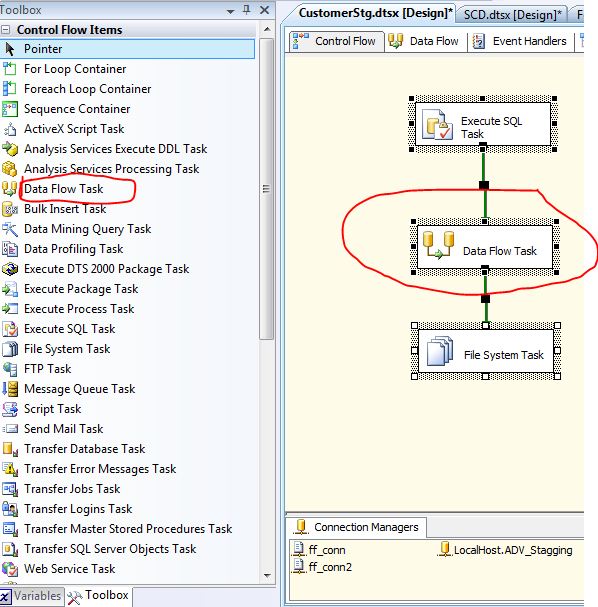
Note: data flow is a part of Control Flow, in the following image you can see data flow and control flow

Control-Flow-images
Control Flow

These are the main Differences between control flow and Data flow in SSIS – MSBI. If you have any queries related to this topic then comment here, we are here to help you. OR if you know any more differences also comment here, then that will be helpful to some others.

Data-Flow-images
DataFlow
You may also search in Google as:
Main differences between Control Flow and Data Flow in SSIS, what are the differences between Control Flow and Data Flow in SSIS. Control flow and Data flow in SSIS etc.

Wednesday, 15 July 2015

SQL Query to get Department wise Maximum Salary Employee Details from SQL server Table

Freshersjunction ready to give explanation about how to write a “SQL Query to get Department wise Maximum Salary Employee Details from SQL server Table”.

                In any Technical interview, most frequently asked technical question from interviewer are (If you are in SQL Server Platform)

1. “SQL Query To Get Highest Salary Employee Details In A Employee Table

2. ” SQL Query To Get Top 2 Highest Salary Employee Details In a SQL Server Table

3. “SQL Query to get Department wise Maximum Salary Employee Details from SQL server Table”

First two topics are we already explain. Now FreshersJunction gives explanation of third topic I.e., “SQL Query to get Department wise Maximum Salary Employee Details from SQL server Table”

                Before writing a SQL Query for Department wise Maximum Salary Employee Details, we need to create employee (--Table name) table.

                How to create a Table in SQL Server

So now we can see employee table below. In the Employee table eno, salary, ename, dno, managerID are column names
sql-server-employee-table

SQL Query for Department wise Maximum Salary Employee Details is

Select * from employee e where salary = (
                                                      select MAX(salary)from employee d where e.dno =d.dno
                                                                      )

For the Above SQL Query output is as following table
top-2-query


                           From the above table you can clearly observe that “naresh” has highest salary in department number 10 (dno = 10) and “Mahesh” has highest salary in department number 20 (dno =20)

FreshersJunction blog hopes now you can get clear idea about “How to write a query for SQL Query for Department wise Maximum Salary Employee Details”

Note : Bookmark this page by pressing Ctrl+D , Then it may easy for you to revision

Conclusion: Anybody have any doubt about “SQL Query for Department wise Maximum Salary Employee Details” topic then comment here, we are ready to help you 24*7

You may also search in Google as:
FreshersJunction – Department wise maximum salary employee details , SQL query to get MAX salary employee details department wise, employee details department wise with maximum salary, maximum salary department wise in SQL Sever, SQL Query to get Department wise Maximum Salary Employee Details from SQL server Table, How to write SQL Query to get Department wise Maximum Salary Employee Details from SQL server Table.

Monday, 13 July 2015

SQL Query To Get Top 2 Highest Salary Employee Details In a SQL Server Table

In the previous class we are discussing about “SQL query to get highest salary employee details”. One more important Technical interview question is “How to write SQL Query To Get Top 2 Highest Employee Details In A SQL Server Table”.


                If you have a table in SQL Server with name of “employee” and column names of “eno, ename, salary, dno, managerID. The employee table is as following.

employee-table-sql-server

If you are writing a query To Get Top 2 Highest Salary Employee Details as follows

Select top 2 salary from employee

then the Output is as follows.
sql-server-top-2

You can clearly observe that the output is incorrect for Top 2 Highest Salary Employee Details In a SQL Server Table. Because if you are not given order by query then top 2 query by default takes least values from employee table.

So now you can write query by using Order by as follows

Select top 2 salary from employee order by salary desc

Now you can see the output, it matches to your question - SQL Query To Get Top 2 Highest Salary Employee Details In A SQL Server Table?.

But this is also not a full answer, because it shows only top2 salary. It will not show employee details. So to get employee details who have top 2 highest salary, write query as

               Select * from employee where salary in (
                                             Select top 2 salary from employee order by salary desc
                                                                                     )

Now you can see the output in the following table

Top-2-Highest-Salary-Employee-Details-SQL-Server-Table

So here you can get the exact answer for “How to write SQL Query To Get Top 2 Highest Employee Details In A SQL Server Table”.


Conclusion: If you any Queries related to “How to write SQL Query To Get Top 2 Highest Employee Details In A SQL Server Table”.  Then comment here, we are ready to help you.

You May also search in Google as:
Freshers Junction – SQL Query for top 2 highest salary employee details, SQL query to two highest salary employee details, top 2 employee salary details in SQL Server, SQL Server Query to get Top 2 Highest Employee Details In A SQL Server Table. Top 2 values in SQL Server. 

Friday, 10 July 2015

SQL Query To Get Highest Salary Employee Details In A Employee Table

Now, here we are discussing about “How to write a SQL Query To Get Highest Salary Employee Details In A Employee Table”.

                When you are in interview on the technology of SQL Server, the most important Technical interview question is write a SQL Query To Get Highest Salary Employee Details?

                You should answer this question in interview because this is the most basic question in SQL Server. If you are not given correct answer, then interviewer fixed as you don’t have basic knowledge on SQL Sever.

For example the employee table is as follows (How to create Table in SQL Server?)
SQL-server-employee-table

-          employee is a table name
-          eno, sal, ename, dno, mgrid are column names

         If you writing the SQL query for Highest Salary Employee Details In A Employee Table as

                                         “Select max(sal) from employee” ,

        then the interviewer fixed as you have basic knowledge on SQL Server.

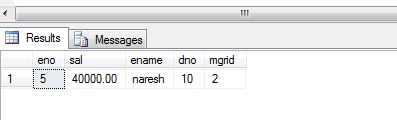
                Because the output of above Query is as follows

output-of-above-Query-images


In the above output you can clearly observe it shows only highest salary in table, but it didn’t show which employee have the highest salary.

                So the exact answer for “SQL Query To Get Highest Salary Employee Details In A Employee Table” is

 Select * from employee where sal = (Select max(sal) from employee)

The output of above query is as follows

output-of-above-query-sql-server


Note : Book mark (Press CTRL +D) this page to review once again before going to Interview

One More Important Technical interview Question is “The Difference between varchar and varchar2

   For Latest Walkins in Bangalore, Hyderabad and Chennai Click here

Conclusion: If you have any Queries related to “How to write a SQL Query To Get Highest Salary Employee Details In A Employee Table”.  Then comment here, we are ready to help you.

You may also search in Google as:
FreshersJunction – SQL query for Highest Salary, How to write SQL query for Highest Salary, SQL Query To Get Highest Salary Employee Details,  highest employee salary SQL Query, SQL Query To Get Highest Salary Employee Details In A Employee Table, How to write a SQL Query To Get Highest Salary Employee Details In A Employee Table, highest salary query in SQL Server.